AWS Certified Solutions Architect – Professional SAP-C01 – Question059

An International company has deployed a multi-tier web application that relies on DynamoDB in a single region. For regulatory reasons they need disaster recovery capability in a separate region with a Recovery Time Objective of 2 hours and a Recovery Point Objective of 24 hours. They should synchronize their data on a regular basis and be able to provision me web application rapidly using CloudFormation. The objective is to minimize changes to the existing web application, control the throughput of DynamoDB used for the synchronization of data and synchronize only the modified elements.
Which design would you choose to meet these requirements?

A.
Use AWS data Pipeline to schedule a DynamoDB cross region copy once a day, create a “Lastupdated” attribute in your DynamoDB table that would represent the timestamp of the last update and use it as a filter.
B. Use EMR and write a custom script to retrieve data from DynamoDB in the current region using a SCAN operation and push it to DynamoDB in the second region.
C. Use AWS data Pipeline to schedule an export of the DynamoDB table to S3 in the current region once a day then schedule another task immediately after it that will import data from S3 to DynamoDB in the other region.
D. Send also each Ante into an SQS queue in me second region; use an auto-scaling group behind the SQS queue to replay the write in the second region.

Correct Answer: A

AWS Certified Solutions Architect – Professional SAP-C01 – Question058


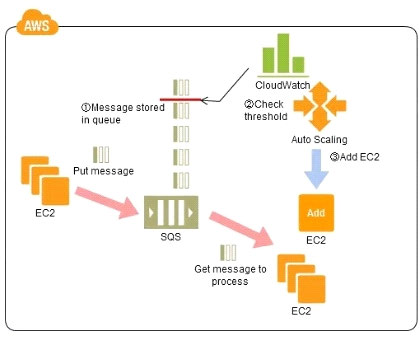
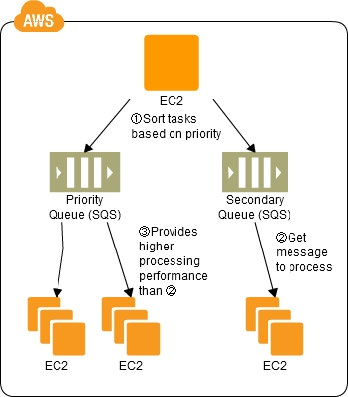
Refer to the architecture diagram above of a batch processing solution using Simple Queue Service (SQS) to set up a message queue between EC2 instances which are used as batch processors Cloud Watch monitors the number of Job requests (queued messages) and an Auto Scaling group adds or deletes batch servers automatically based on parameters set in Cloud Watch alarms.
You can use this architecture to implement which of the following features in a cost effective and efficient manner?

A.
Reduce the overall lime for executing jobs through parallel processing by allowing a busy EC2 instance that receives a message to pass it to the next instance in a daisy-chain setup.
B. Implement fault tolerance against EC2 instance failure since messages would remain in SQS and worn can continue with recovery of EC2 instances implement fault tolerance against SQS failure by backing up messages to S3.
C. Implement message passing between EC2 instances within a batch by exchanging messages through SQS.
D. Coordinate number of EC2 instances with number of job requests automatically thus Improving cost effectiveness.
E. Handle high priority jobs before lower priority jobs by assigning a priority metadata field to SQS messages.

Correct Answer: D

Explanation:

Explanation: There are cases where a large number of batch jobs may need processing, and where the jobs may need to be re-prioritized. For example, one such case is one where there are differences between different levels of services for unpaid users versus
subscriber users (such as the time until publication) in services enabling, for example, presentation files to be uploaded for publication from a web browser. When the user uploads a presentation file, the conversion processes, for example, for publication are performed as batch processes on the system side, and the file is published after the conversion. Is it then necessary to be able to assign the level of priority to the batch processes for each type of subscriber? Explanation of the Cloud Solution/Pattern A queue is used in controlling batch jobs. The queue need only be provided with priority numbers. Job requests are controlled by the queue, and the job requests in the queue are processed by a batch server. In Cloud computing, a highly reliable queue is provided as a service, which you can use to structure a highly reliable batch system with ease. You may prepare multiple queues depending on priority levels, with job requests put into the queues depending on their priority levels, to apply prioritization to batch processes. The performance (number) of batch servers corresponding to a queue must be in accordance with the priority level thereof.
Implementation In AWS, the queue service is the Simple Queue Service (SQS). Multiple SQS queues may be prepared to prepare queues for individual priority levels (with a priority queue and a secondary queue). Moreover, you may also use the message Delayed Send function to delay process execution. Use SQS to prepare multiple queues for the individual priority levels. Place those processes to be executed immediately (job requests) in the high priority queue. Prepare numbers of batch servers, for processing the job requests of the queues, depending on the priority levels. Queues have a message “Delayed Send” function. You can use this to delay the time for starting a process.
Configuration

Benefits
You can increase or decrease the number of servers for processing jobs to change automatically the processing speeds of the priority queues and secondary queues. You can handle performance and service requirements through merely increasing or decreasing the number of EC2 instances used in job processing. Even if an EC2 were to fail, the messages (jobs) would remain in the queue service, enabling processing to be continued immediately upon recovery of the EC2 instance, producing a system that is robust to failure. Cautions Depending on the balance between the number of EC2 instances for performing the processes and the number of messages that are queued, there may be cases where processing in the secondary queue may be completed first, so you need to monitor the processing speeds in the primary queue and the secondary queue.

AWS Certified Solutions Architect – Professional SAP-C01 – Question057

You are designing an intrusion detection prevention (IDS/IPS) solution for a customer web application in a single VPC. You are considering the options for implementing IOS IPS protection for traffic coming from the Internet.
Which of the following options would you consider? (Choose two.)

A.
Implement IDS/IPS agents on each Instance running in VPC
B. Configure an instance in each subnet to switch its network interface card to promiscuous mode and analyze network traffic.
C. Implement Elastic Load Balancing with SSL listeners in front of the web applications
D. Implement a reverse proxy layer in front of web servers and configure IDS/IPS agents on each reverse proxy server.

Correct Answer: AD

Explanation:

Explanation: EC2 does not allow promiscuous mode, and you cannot put something in between the ELB and the web server (like a listener or IDP)

AWS Certified Solutions Architect – Professional SAP-C01 – Question056

Your company is getting ready to do a major public announcement of a social media site on AWS. The website is running on EC2 instances deployed across multiple Availability Zones with a Multi-AZ RDS MySQL Extra Large DB Instance. The site performs a high number of small reads and writes per second and relies on an eventual consistency model. After comprehensive tests you discover that there is read contention on RDS MySQL.
Which are the best approaches to meet these requirements? (Choose two.)

A.
Deploy ElastiCache in-memory cache running in each availability zone
B. Implement sharding to distribute load to multiple RDS MySQL instances
C. Increase the RDS MySQL Instance size and Implement provisioned IOPS
D. Add an RDS MySQL read replica in each availability zone

Correct Answer: AD

AWS Certified Solutions Architect – Professional SAP-C01 – Question055

Company B is launching a new game app for mobile devices. Users will log into the game using their existing social media account to streamline data capture. Company B would like to directly save player data and scoring information from the mobile app to a DynamoDS table named Score Data When a user saves their game the progress data will be stored to the Game state S3 bucket.
What is the best approach for storing data to DynamoDB and S3?

A.
Use an EC2 Instance that is launched with an EC2 role providing access to the Score Data DynamoDB table and the GameState S3 bucket that communicates with the mobile app via web services.
B. Use temporary security credentials that assume a role providing access to the Score Data DynamoDB table and the Game State S3 bucket using web identity federation.
C. Use Login with Amazon allowing users to sign in with an Amazon account providing the mobile app with access to the Score Data DynamoDB table and the Game State S3 bucket.
D. Use an IAM user with access credentials assigned a role providing access to the Score Data DynamoDB table and the Game State S3 bucket for distribution with the mobile app.

Correct Answer: B

Explanation:

Explanation: Web Identity Federation Imagine that you are creating a mobile app that accesses AWS resources, such as a game that runs on a mobile device and stores player and score information using Amazon S3 and DynamoDB. When you write such an app, you’ll make requests to AWS services that must be signed with an AWS access key. However, we strongly recommend that you do not embed or distribute long-term AWS credentials with apps that a user downloads to a device, even in an encrypted store. Instead, build your app so that it requests temporary AWS security credentials dynamically when needed using web identity federation. The supplied temporary credentials map to an AWS role that has only the permissions needed to perform the tasks required by the mobile app. With web identity federation, you don’t need to create custom sign-in code or manage your own user identities. Instead, users of your app can sign in using a well-known identity provider (IdP) —such as Login with Amazon, Facebook, Google, or any other OpenID Connect (OIDC)-compatible IdP, receive an authentication token, and then exchange that token for temporary security credentials in AWS that map to an IAM role with permissions to use the resources in your AWS account. Using an IdP helps you keep your AWS account secure, because you don’t have to embed and distribute long-term security credentials with your application.
For most scenarios, we recommend that you use Amazon Cognito because it acts as an identity broker and does much of the federation work for you. For details, see the following section, Using Amazon Cognito for Mobile Apps. If you don’t use Amazon Cognito, then you must write code that interacts with a web IdP (Login with Amazon, Facebook, Google, or any other OIDC-compatible IdP) and then calls the AssumeRoleWithWebIdentity API to trade the authentication token you get from those IdPs for AWS temporary security credentials. If you have already used this approach for existing apps, you can continue to use it.
Using Amazon Cognito for Mobile Apps The preferred way to use web identity federation is to use Amazon Cognito. For example, Adele the developer is building a game for a mobile device where user data such as scores and profiles is stored in Amazon S3 and Amazon DynamoDB. Adele could also store this data locally on the device and use Amazon Cognito to keep it synchronized across devices. She knows that for security and maintenance reasons, long-term AWS security credentials should not be distributed with the game. She also knows that the game might have a large number of users. For all of these reasons, she does not want to create new user identities in IAM for each player.
Instead, she builds the game so that users can sign in using an identity that they’ve already established with a well-known identity provider, such as Login with Amazon, Facebook, Google, or any OpenID Connect (OIDC)-compatible identity provider. Her game can take advantage of the authentication mechanism from one of these providers to validate the user’s identity. To enable the mobile app to access her AWS resources, Adele first registers for a developer ID with her chosen IdPs.
She also configures the application with each of these providers. In her AWS account that contains the Amazon S3 bucket and DynamoDB table for the game, Adele uses Amazon Cognito to create IAM roles that precisely define permissions that the game needs. If she is using an OIDC IdP, she also creates an IAM OIDC identity provider entity to establish trust between her AWS account and the IdP. In the app’s code, Adele calls the sign-in interface for the IdP that she configured previously.
The IdP handles all the details of letting the user sign in, and the app gets an OAuth access token or OIDC ID token from the provider. Adele’s app can trade this authentication information for a set of temporary security credentials that consist of an AWS access key ID, a secret access key, and a session token. The app can then use these credentials to access web services offered by AWS. The app is limited to the permissions that are defined in the role that it assumes. The following figure shows a simplified flow for how this might work, using Login with Amazon as the IdP. For Step 2, the app can also use Facebook, Google, or any OIDC-compatible identity provider, but that’s not shown here. Sample workflow using Amazon Cognito to federate users for a mobile application
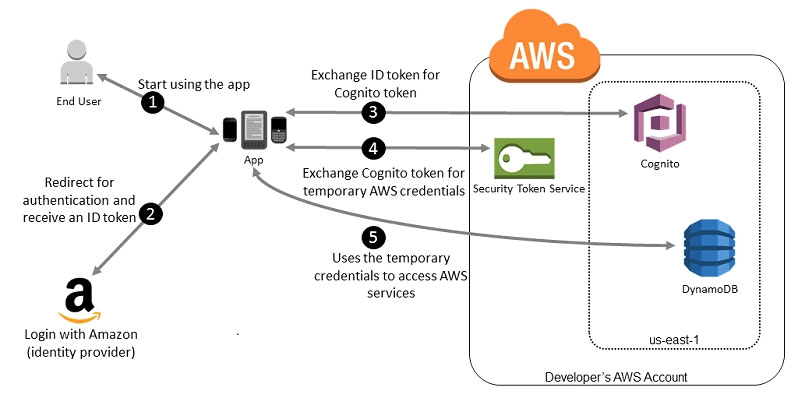
A customer starts your app on a mobile device. The app asks the user to sign in. The app uses Login with Amazon resources to accept the user’s credentials. The app uses Cognito APIs to exchange the Login with Amazon ID token for a Cognito token. The app requests temporary security credentials from AWS STS, passing the Cognito token. The temporary security credentials can be used by the app to access any AWS resources required by the app to operate. The role associated with the temporary security credentials and its assigned policies determines what can be accessed. Use the following process to configure your app to use Amazon Cognito to authenticate users and give your app access to AWS resources. For specific steps to accomplish this scenario, consult the documentation for Amazon Cognito. (Optional) Sign up as a developer with Login with Amazon, Facebook, Google, or any other OpenID Connect (OIDC)– compatible identity provider and configure one or more apps with the provider. This step is optional because Amazon Cognito also supports unauthenticated (guest) access for your users. Go to Amazon Cognito in the AWS Management Console. Use the Amazon Cognito wizard to create an identity pool, which is a container that Amazon Cognito uses to keep end user identities organized for your apps.
You can share identity pools between apps. When you set up an identity pool, Amazon Cognito creates one or two IAM roles (one for authenticated identities, and one for unauthenticated “guest” identities) that define permissions for Amazon Cognito users. Download and integrate the AWS SDK for iOS or the AWS SDK for Android with your app, and import the files required to use Amazon Cognito. Create an instance of the Amazon Cognito credentials provider, passing the identity pool ID, your AWS account number, and the Amazon Resource Name (ARN) of the roles that you associated with the identity pool.
The Amazon Cognito wizard in the AWS Management Console provides sample code to help you get started. When your app accesses an AWS resource, pass the credentials provider instance to the client object, which passes temporary security credentials to the client. The permissions for the credentials are based on the role or roles that you defined earlier.
AWS Certified Solutions Architect – Professional SAP-C01 – Question054

You are implementing a URL whitelisting system for a company that wants to restrict outbound HTTP'S connections to specific domains from their EC2-hosted applications. You deploy a single EC2 instance running proxy software and configure It to accept traffic from all subnets and EC2 instances in the VPC. You configure the proxy to only pass through traffic to domains that you define in its whitelist configuration.
You have a nightly maintenance window or 10 minutes where all instances fetch new software updates. Each update Is about 200MB In size and there are 500 instances In the VPC that routinely fetch updates. After a few days you notice that some machines are failing to successfully download some, but not all of their updates within the maintenance window. The download URLs used for these updates are correctly listed in the proxy's whitelist configuration and you are able to access them manually using a web browser on the instances.
What might be happening? (Choose two.)

A.
You are running the proxy on an undersized EC2 instance type so network throughput is not sufficient for all instances to download their updates in time.
B. You are running the proxy on a sufficiently-sized EC2 instance in a private subnet and its network throughput is being throttled by a NAT running on an undersized EC2 instance.
C. The route table for the subnets containing the affected EC2 instances is not configured to direct network traffic for the software update locations to the proxy.
D. You have not allocated enough storage to the EC2 instance running the proxy so the network buffer is filling up, causing some requests to fail.
E. You are running the proxy in a public subnet but have not allocated enough EIPs to support the needed network throughput through the Internet Gateway (IGW).

Correct Answer: AB

AWS Certified Solutions Architect – Professional SAP-C01 – Question053

An AWS customer runs a public blogging website. The site users upload two million blog entries a month. The average blog entry size is 200 KB. The access rate to blog entries drops to negligible 6 months after publication and users rarely access a blog entry 1 year after publication.
Additionally, blog entries have a high update rate during the first 3 months following publication, this drops to no updates after 6 months. The customer wants to use CloudFront to improve his user's load times.
Which of the following recommendations would you make to the customer?

A.
Duplicate entries into two different buckets and create two separate CloudFront distributions where S3 access is restricted only to Cloud Front identity
B. Create a CloudFront distribution with “US Europe” price class for US/Europe users and a different CloudFront distribution with “All Edge Locations” for the remaining users.
C. Create a CloudFront distribution with S3 access restricted only to the CloudFront identity and partition the blog entry's location in S3 according to the month it was uploaded to be used with CloudFront behaviors.
D. Create a CloudFront distribution with Restrict Viewer Access Forward Query string set to true and minimum TTL of 0.

Correct Answer: C

AWS Certified Solutions Architect – Professional SAP-C01 – Question052

You are responsible for a legacy web application whose server environment is approaching end of life You would like to migrate this application to AWS as quickly as possible, since the application environment currently has the following limitations:

  • The VM's single 10GB VMDK is almost full;
  • Me virtual network interface still uses the 10Mbps driver, which leaves your 100Mbps WAN connection completely underutilized;
  • It is currently running on a highly customized. Windows VM within a VMware environment;
  • You do not have me installation media;

This is a mission critical application with an RTO (Recovery Time Objective) of 8 hours. RPO (Recovery Point Objective) of 1 hour.
How could you best migrate this application to AWS while meeting your business continuity requirements?

A.
Use the EC2 VM Import Connector for vCenter to import the VM into EC2.
B. Use Import/Export to import the VM as an ESS snapshot and attach to EC2.
C. Use S3 to create a backup of the VM and restore the data into EC2.
D. Use me ec2-bundle-instance API to Import an Image of the VM into EC2

Correct Answer: A

Explanation:

AWS Certified Solutions Architect – Professional SAP-C01 – Question051

A customer has a 10 GB AWS Direct Connect connection to an AWS region where they have a web application hosted on Amazon Elastic Computer Cloud (EC2). The application has dependencies on an on-premises mainframe database that uses a BASE (Basic Available, Soft state, Eventual consistency) rather than an ACID (Atomicity, Consistency, Isolation, Durability) consistency model. The application is exhibiting undesirable behavior because the database is not able to handle the volume of writes.
How can you reduce the load on your on-premises database resources in the most cost-effective way?

A.
Use an Amazon Elastic Map Reduce (EMR) S3DistCp as a synchronization mechanism between the on-premises database and a Hadoop cluster on AWS.
B. Modify the application to write to an Amazon SQS queue and develop a worker process to flush the queue to the on-premises database.
C. Modify the application to use DynamoDB to feed an EMR cluster which uses a map function to write to the on-premises database.
D. Provision an RDS read-replica database on AWS to handle the writes and synchronize the two databases using Data Pipeline.

AWS Certified Solutions Architect – Professional SAP-C01 – Question050

An enterprise wants to use a third-party SaaS application. The SaaS application needs to have access to issue several API commands to discover Amazon EC2 resources running within the enterprise's account The enterprise has internal security policies that require any outside access to their environment must conform to the principles of least privilege and there must be controls in place to ensure that the credentials used by the SaaS vendor cannot be used by any other third party.
Which of the following would meet all of these conditions?

A.
From the AWS Management Console, navigate to the Security Credentials page and retrieve the access and secret key for your account.
B. Create an IAM user within the enterprise account assign a user policy to the IAM user that allows only the actions required by the SaaS application create a new access and secret key for the user and provide these credentials to the SaaS provider.
C. Create an IAM role for cross-account access allows the SaaS provider's account to assume the role and assign it a policy that allows only the actions required by the SaaS application.
D. Create an IAM role for EC2 instances, assign it a policy that allows only the actions required tor the SaaS application to work, provide the role ARN to the SaaS provider to use when launching their application instances.

Correct Answer: C

Explanation:

Explanation: Granting Cross-account Permission to objects It Does Not Own In this example scenario, you own a bucket and you have enabled other AWS accounts to upload objects. That is, your bucket can have objects that other AWS accounts own.
Now, suppose as a bucket owner, you need to grant cross-account permission on objects, regardless of who the owner is, to a user in another account. For example, that user could be a billing application that needs to access object metadata. There are two core issues: The bucket owner has no permissions on those objects created by other AWS accounts. So for the bucket owner to grant permissions on objects it does not own, the object owner, the AWS account that created the objects, must first grant permission to the bucket owner. The bucket owner can then delegate those permissions. Bucket owner account can delegate permissions to users in its own account but it cannot delegate permissions to other AWS accounts, because cross-account delegation is not supported. In this scenario, the bucket owner can create an AWS Identity and Access Management (IAM) role with permission to access objects, and grant another AWS account permission to assume the role temporarily enabling it to access objects in the bucket.
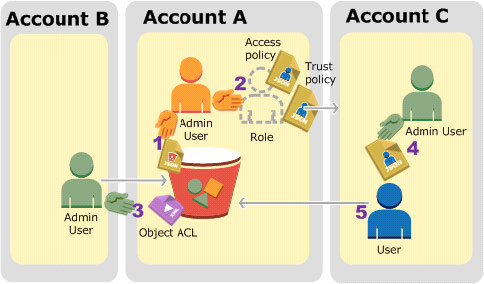
Background: Cross-Account Permissions and Using IAM Roles IAM roles enable several scenarios to delegate access to your resources, and cross-account access is one of the key scenarios. In this example, the bucket owner, Account A, uses an IAM role to temporarily delegate object access cross-account to users in another AWS account, Account C. Each IAM role you create has two policies attached to it: A trust policy identifying another AWS account that can assume the role. An access policy defining what permissions—for example, s3:GetObject—are allowed when someone assumes the role.
For a list of permissions you can specify in a policy, see Specifying Permissions in a Policy. The AWS account identified in the trust policy then grants its user permission to assume the role. The user can then do the following to access objects: Assume the role and, in response, get temporary security credentials. Using the temporary security credentials, access the objects in the bucket. For more information about IAM roles, go to Roles (Delegation and Federation) in IAM User Guide. The following is a summary of the walkthrough steps:

Account A administrator user attaches a bucket policy granting Account B conditional permission to upload objects. Account A administrator creates an IAM role, establishing trust with Account C, so users in that account can access Account
A.The access policy attached to the role limits what user in Account C can do when the user accesses Account A. Account B administrator uploads an object to the bucket owned by Account A, granting full-control permission to the bucket owner. Account C administrator creates a user and attaches a user policy that allows the user to assume the role. User in Account C first assumes the role, which returns the user temporary security credentials.
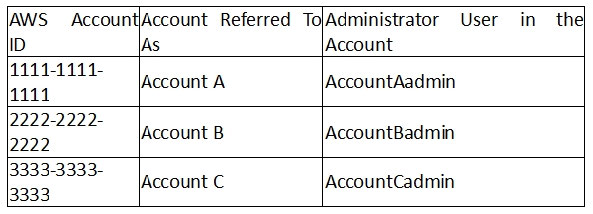
Using those temporary credentials, the user then accesses objects in the bucket. For this example, you need three accounts. The following table shows how we refer to these accounts and the administrator users in these accounts. Per IAM guidelines (see About Using an Administrator User to Create Resources and Grant Permissions) we do not use the account root credentials in this walkthrough. Instead, you create an administrator user in each account and use those credentials in creating resources and granting them permissions